


Outlook - Expand Ribbon of Tabs

Apr 02, 2024
 37
37
About Outlook Ribbon
- The top portion of the Outlook application is called the Ribbon.
- The Ribbon contains buttons to perform actions (i.e New Email, Delete, iManage, etc.)
- You are able to change the view based on preference, but it is strongly recommended to have it fully expanded and always showing.
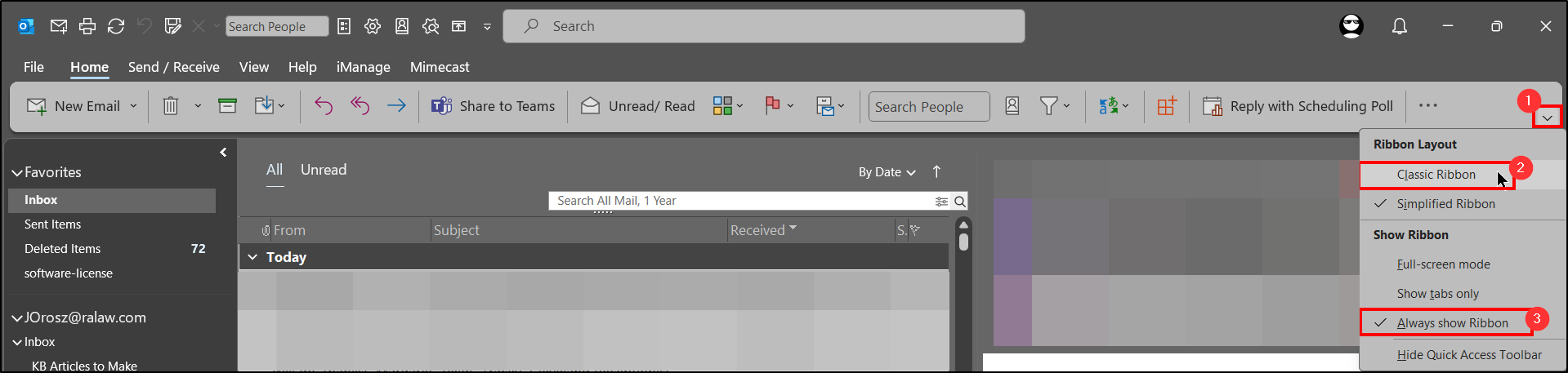
Setting Ribbon to be Classic and Always Showing
1. Click the arrow towards the right hand side of the ribbon pane.
2. Choose Classic Ribbon.
3. Repeat step 1 and then choose Always Show Ribbon.
Questions? Contact Us!
IT Support Desk


Hours - 8:00AM - 6:00PM EST
Email - [email protected]
Phone - (330) 849-6699*
*For Emergency Assistance please use option 8

