


DialPad - Meeting Rooms (Audio & Video Conference Calls)

Aug 13, 2025
 148
148
About Dialpad Meeting Rooms
- If you wish to connect 149 or more active calls, Dialpad Meeting Rooms are the perfect solution if you do not have the capabilities of Zoom or MeetingOne.
- Each Dialpad account comes with a Personal Meeting Room in the form of a Link and Phone Number
- The Link - Used for people to join by Audio and Video.
- The Phone Number - Used for people to join by Audio only. They will enter a PIN as well to join.
Navigating to Dialpad Meeting Rooms - Desktop
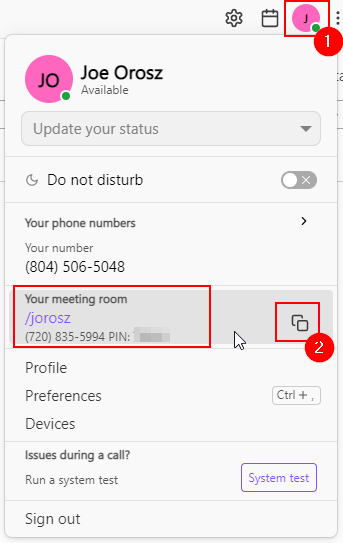
1. Within the Dialpad Desktop application, clicking the Profile Icon will show your meeting room link and phone number.
2. Clicking the Copy Icon will add it to your clipboard, so you can paste it where you need it (emails, invites, etc.)
NOTE: All phone users will need to enter the PIN.
Questions? Contact Us!
IT Support Desk


Hours - 8:00AM - 6:00PM EST
Email - [email protected]
Phone - (330) 849-6699*
*For Emergency Assistance please use option 8

