


DialPad - Selecting Microphone, Speaker and Ringing Sounds - Desktop

Apr 02, 2024
 49
49
Selecting Microphone & Speaker Devices
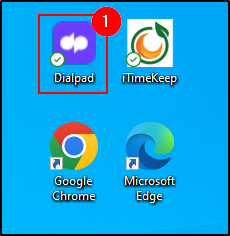
1. Open the DialPad application on your computer.
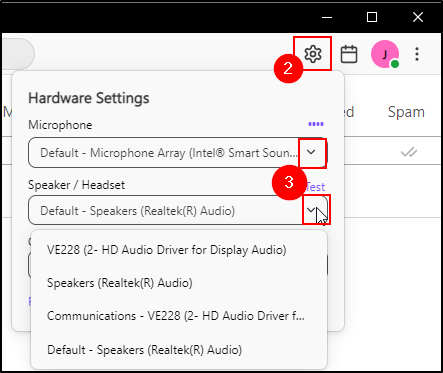
2. Click the Gear Icon on the top right of the DialPad window.
3. From here, click the dropdown to what you would like the audio to be playing out of.
Common Devices
- Speakers (Realtek) - Typically your computer speakers.
- Microphone Array - Microphone in computer.
- Jabra Link - Headset.
Selecting Where Ringing Sound Is Played From Computer
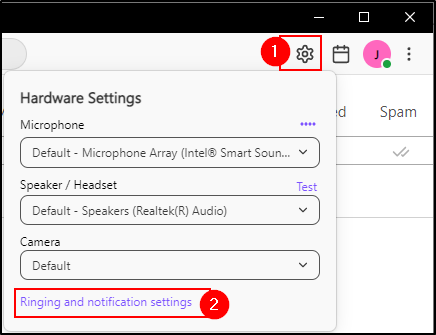
1. Click the Gear Icon on the top right of the DialPad window.
2. Click Ringing and Notification Settings
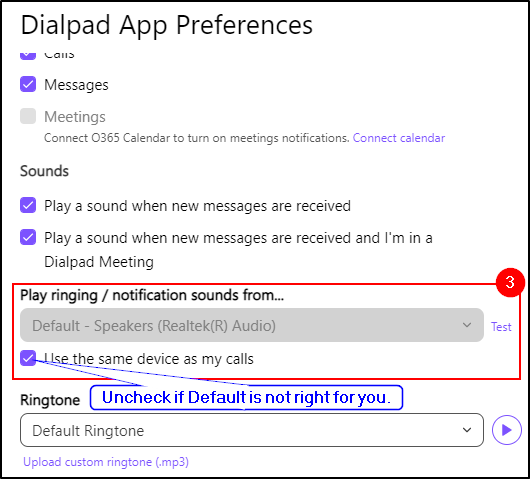
3. A pop-up will appear, there is a section to update the location of which the telephone will ring from. By Default, it will ring from where you hear calls from.
Uncheck this if you wish for it to come from a different location and choose accordingly.
Common Devices
- Speakers (Realtek) - Typically your computer speakers.
- Jabra Link - Headset.
Questions? Contact Us!
IT Support Desk


Hours - 8:00AM - 6:00PM EST
Email - [email protected]
Phone - (330) 849-6699*
*For Emergency Assistance please use option 8

