


Determining the Size of a File

Apr 02, 2024
 99
99
About File Sizes
- Files can become large in size and can cause issues with sending emails or saving to our networks drives (P or M).
- Pages of a document do not determine the size of a file. The contents and image quality increases this.
Important Notes:
- If you attach files that have a combined total of more than 20 MBs, the email will not be sent.
- IT strongly recommends to use Mimecast Large File Send if sending multiple attachments to avoid bounce backs.
File Size Chart
| Name of Size | Size in KB |
| Kilobyte (KB) | 1 KB |
| Megabyte (MB) | 1,000 KB |
| Gigabyte (GB) | 1,000,000 KB |
In Example:
- If you have a document that is 2,000 KB in size, this would be 2 MB in size.
- If you have a document that is 22,000 KB in size, this would be 22 MB in size and too large for emails when attached. Use Mimecast Large File Send.
Determining the Size of a File
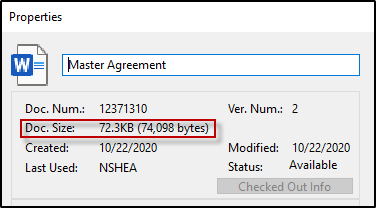
iManage:
- Search or navigate to a file, right click on the file and click on Properties.
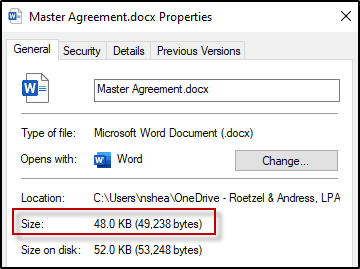
From your Desktop or Saved Locally on Computer:
- Right click on the file and click on Properties.
Questions? Contact Us!
IT Support Desk


Hours - 8:00AM - 6:00PM EST
Email - [email protected]
Phone - (330) 849-6699*
*For Emergency Assistance please use option 8

