


Windows - How to Pin Apps to Taskbar

Apr 02, 2024
 74
74
Windows - How to Pin Apps to Taskbar
- While an application is open (i.e Nuance PDF), right click on the icon on the Taskbar (bottom bar of Windows).
- Select Pin to Taskbar.
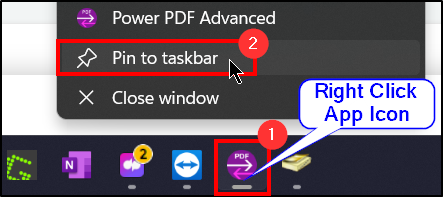
Now if the application is closed, the icon will remain pinned to the Taskbar for convenience.
Questions? Contact Us!
IT Support Desk


Hours - 8:00AM - 6:00PM EST
Email - [email protected]
Phone - (330) 849-6699*
*For Emergency Assistance please use option 8

